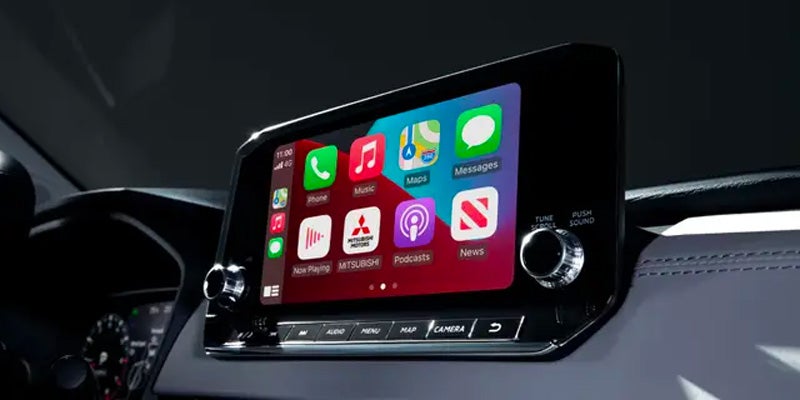
Blog / Connecting Apple Car Play To Your Mitsubishi

2026 Mitsubishi Remote Technology Guide: How Connected Features Work for You

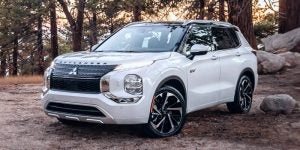
mitsubishi vehicle parked near forest trees

Modern drivers expect a reliable ride and a vehicle that stays connected to their daily lives. The 2026 Mitsubishi technology features accomplish exactly that by helping you manage, monitor, and interact with your vehicle from anywhere. If you are running errands or planning a long trip, these tools simplify ownership. Reach out to the team at DELLA Mitsubishi in Plattsburgh, NY, to learn more about integrating these intuitive features into your daily commute.

What Are 2026 Mitsubishi Technology Features?

The 2026 Mitsubishi technology suite gives drivers real-time access to key vehicle functions. Through connected car technology, owners interact with their vehicle remotely using a compatible smartphone. This system goes far beyond basic Bluetooth pairing. It forms a complete ecosystem supporting Apple CarPlay© and Android Auto© that works around your schedule. You can easily check your vehicle's status and control functions from a distance without needing any advanced technical knowledge.

Using the Mitsubishi Smartphone App

The Mitsubishi smartphone app puts vehicle controls right at your fingertips. You can lock and unlock your doors, check your vehicle's location, and receive important alerts directly on your phone. For drivers in Plattsburgh, NY, this accessibility proves especially useful during colder months when you want to warm up your vehicle before heading out. The app is compatible with iOS© and Android© devices, ensuring seamless integration for a wide range of users.

Mitsubishi Remote Services in Plattsburgh, NY

Mitsubishi remote services offer Plattsburgh NY drivers functions extending well beyond the app. These services form a broader connected platform keeping your 2026 Mitsubishi communicating with service networks. Remote start, door lock monitoring, and vehicle health reports represent just a few available tools. These features provide peace of mind if your vehicle is parked at home, at work, or anywhere else. Mitsubishi built its 2026 lineup to support this connectivity from the ground up.

How the Mitsubishi Warranty Supports You

Mitsubishi Motors backs every new vehicle with America's Best-Backed Vehicles coverage. This includes a 10-Year/100,000-Mile Powertrain Limited Warranty, 2-Year/30,000-Mile Limited Maintenance, and 5 years of roadside assistance. Knowing your vehicle has this coverage adds confidence as you explore your new technology features. This comprehensive backing ensures your digital experience receives support from a brand committed to long-term ownership satisfaction.

Visit Della Mitsubishi to Learn More

Experiencing Mitsubishi connected car technology firsthand provides a clear sense of how intuitive these tools truly are. Stop by DELLA Mitsubishi in Plattsburgh, NY, and speak with a team member today. We will walk you through the smartphone app features and remote services to help you find the right model for your lifestyle. To view our current inventory and schedule your demonstration, please explore our digital showroom at dellamitsubishi.com.
Posted in:

Related Posts

mitsu tech 07 (31)

How To Connect Apple Car Play and Android Auto to Your Mitsubishi

Modern driving is as much about connectivity as it is about performance, and new Mitsubishi technology ensures you experience both seamlessly. Whether you're commuting through Plattsburgh, NY, or embarking on a long road trip, staying connected to your smartphone has never been easier. Mitsubishi Apple Car Play and Mitsubsihi Android Auto integration allow you to safely access essential apps, navigation, and entertainment directly from your vehicle's infotainment system. By connecting your iPhone or Android device to your new Mitsubishi, you unlock a smarter, safer way to drive. Let’s explore how to get started with these technologies. Setting Up Apple Car Play in Your Mitsubishi Connecting your iPhone to your new Mitsubishi using Apple Car Play is simple and intuitive, thanks to the advanced Mitsubishi technology and Infomat system. Start by ensuring your iPhone runs iOS 7.1 or later and that your Mitsubishi model supports Apple Car Play. First, connect your iPhone to your vehicle using a Lightning cable. Upon connection, the Infomat system will prompt you to enable Apple Car Play. Once enabled, your car's touchscreen will mirror your iPhone's key functions, including Maps, Messages, and Music. Voice commands via Siri provide hands-free control, allowing you to stay focused on the road. Whether you’re navigating the streets of Plattsburgh, NY, or streaming your favorite playlist, Mitsubishi Apple Car Play makes the experience both safe and enjoyable. How to Use Android Auto in Your Mitsubishi If you're an Android user, Mitsubishi Android Auto delivers a similarly fantastic in-car experience. Begin by checking that your Android device runs version 5.0 or higher and that your Mitsubishi supports Android Auto. To connect, use a USB cable to link your phone to your car’s Infomat system. Follow the on-screen prompts to enable Android Auto. Once activated, you’ll see a familiar interface on your vehicle's touchscreen, giving you access to Google Maps, Google Assistant, and even popular music apps. With voice control, you can send messages, make calls, or get directions—all without taking your hands off the wheel. It's the perfect way to stay connected while exploring everything Plattsburgh, NY, has to offer. Tips for Seamless Smartphone Connectivity Mitsubishi technology ensures a smooth integration process, but here are a few tips to enhance your experience when connecting your iPhone or Android to your new Mitsubishi: - Always use a high-quality USB cable to maintain a stable connection. - Ensure your phone’s operating system and Mitsubishi’s Infomat software are up to date for optimal compatibility. - Familiarize yourself with the voice command features of Siri and Google Assistant for effortless hands-free functionality. By following these steps, you’ll enjoy uninterrupted access to the features you rely on most during your daily drives. Experience the Best of New Mitsubishi Technology in Plattsburgh, NY At Della Mitsubishi, we’re committed to helping drivers in Plattsburgh, NY, get the most out of their vehicles. With Mitsubishi Apple Car Play and Mitsubishi Android Auto, staying connected has never been easier or safer. Visit us today to test drive a Mitsubishi at Della Mitsubishi and experience the cutting-edge Infomat system for yourself. Our team is here to answer your questions about connecting your iPhone or Android to your new Mitsubishi and to ensure your driving experience is seamless and enjoyable.

Infotainment system inside a 2025 Mitsubishi

What Makes the Mitsubishi Infotainment System Worth Knowing About

If you are shopping for a new SUV, the technology inside matters just as much as the engine. The Mitsubishi infotainment system is a standout feature across the current lineup, offering a connected, intuitive experience that makes every drive enjoyable. Commuting across town or heading out for a weekend adventure, you should understand what this system offers. Reach out to Della Mitsubishi in Plattsburgh, NY, to learn more today. How the Mitsubishi Infotainment System Keeps You Connected The Mitsubishi infotainment system centers around a responsive touchscreen display, granting quick access to navigation, audio, and phone controls without taking your focus off the road. Screen sizes vary by model, from a 7" display in the Outlander Sport to a 12.3" display in the Outlander PHEV. The interface feels familiar and easy to navigate immediately. Smartphone integration is a key component. Apple CarPlay© and Android Auto© compatibility allow you to mirror phone apps, maps, and music directly on the screen. You can use trusted navigation apps without fumbling with a separate device. Entertainment and Audio Options Great sound transforms a drive, and Mitsubishi pairs its infotainment system with excellent audio options. Higher trims of models like the Outlander and Outlander PHEV feature premium sound systems delivering clear audio for streaming music or taking hands-free calls. The system supports Bluetooth© connectivity to sync devices wirelessly. Available Wi-Fi© hotspot capability on select models keeps passengers connected on longer trips. Safety Features Integrated With the Display Safety technology ties directly into the display. Many models include a rearview camera feeding the touchscreen when shifting into reverse, providing a clear view behind you. Depending on the trim, a 360-degree surround-view camera system displays multiple vehicle angles simultaneously. These features work alongside the Forward Collision Mitigation system of Mitsubishi and other driver-assist technologies to create a confident driving experience. Which Mitsubishi Models Feature This System? The infotainment system is available across the current SUV lineup of Mitsubishi, including the 2026 Outlander, 2026 Outlander PHEV, 2026 Eclipse Cross, and 2027 Outlander Sport. Each model brings this technology to different buyers, from entry-level crossover seekers to families needing a three-row SUV. The 2026 Outlander PHEV offers plug-in hybrid capability with an accurate 38-mile all-electric battery range. Every new Mitsubishi includes an industry-leading warranty program featuring a 10-Year/100,000-Mile Powertrain Limited Warranty, 2-Year/30,000-Mile Limited Maintenance, and five years of roadside assistance. Experience the Mitsubishi Infotainment System in Person Reading about technology is one thing, but experiencing it firsthand is another. The best way to understand the features is to sit behind the wheel. Drivers can explore the full lineup at Della Mitsubishi in Plattsburgh, NY. Visit https://www.dellamitsubishi.com/ to browse current inventory, schedule a test drive, or learn more about available models. The right fit might be closer than you think.

Vehicle infotainment screen with Apple CarPlay display.

Mitsubishi Apple CarPlay®: Your iPhone, now in the Dashboard

Apple CarPlay® solves a problem created by smartphones themselves: they're incredibly handy and absolutely the wrong thing to be staring at while driving. In a Mitsubishi, CarPlay takes compatible iPhone functions and puts them on the vehicle's infotainment display, where they're considerably easier to access. Navigation, calls, messages, music, podcasts, and supported third-party apps can all come along. For drivers around Plattsburgh, NY, the attraction isn't complicated. You already know how your phone works. Now the car speaks the same language. Which Mitsubishi Models Get Apple CarPlay? Apple CarPlay® is offered across several Mitsubishi SUVs, including the 2026 Outlander, 2026 Outlander PHEV, 2026 Eclipse Cross, and 2027 Outlander Sport. Availability and connection type can differ by model and trim, so it's worth checking the equipment on the specific Mitsubishi you're considering. The system operates through the central infotainment display, essentially giving your iPhone a dashboard-friendly interface. That means you don't have to learn an entirely new ecosystem just because you've shut the car door. Connecting Your iPhone Without Making It Complicated Setting up wired Apple CarPlay® starts with connecting a compatible iPhone to the appropriate USB port using a compatible cable. Follow the prompts on the phone and Mitsubishi display, approve CarPlay, and supported apps appear on the touchscreen. Mitsubishi models equipped with wireless Apple CarPlay® remove the cable from the equation. With Bluetooth® and Wi-Fi enabled on the iPhone, pair the device through the vehicle's infotainment system and follow the on-screen instructions. Once initial setup is complete, compatible wireless systems can reconnect automatically on future drives. It's the sort of technology that's at its best when you stop noticing it's there. CarPlay Does More Than Put Maps on a Bigger Screen Navigation is an obvious benefit, but Apple CarPlay® becomes more interesting once it's configured around how you drive. Siri® voice control can handle compatible calls, messages, directions, and audio requests, reducing the need to reach for the phone itself. Supported apps can include Apple Maps, Google Maps, Spotify, podcasts, and messaging services. You can also rearrange compatible CarPlay apps through your iPhone settings, putting frequently used functions where you want them. Keeping iOS updated can help maintain compatibility and give you access to Apple's latest CarPlay improvements. The Mitsubishi Around the Screen Still Counts Connectivity is only one part of choosing a vehicle, of course. Mitsubishi backs eligible new vehicles with substantial ownership coverage, including its 10-Year/100,000-Mile Powertrain Limited Warranty for the original owner, 2-Year/30,000-Mile Limited Maintenance, and roadside assistance coverage, subject to applicable terms. Apple CarPlay® won't make an Outlander tow more, give an Eclipse Cross additional cargo room, or add electric range to an Outlander PHEV. What it does is make the technology you already carry around every day fit naturally into the driving experience. Try Apple CarPlay Before You Choose Your Mitsubishi The easiest way to understand Apple CarPlay® is to connect your own iPhone and start pressing things. Drivers around Plattsburgh, NY, can visit Della Mitsubishi to explore new Mitsubishi models, compare infotainment systems, and see how wired or available wireless Apple CarPlay® works in the vehicle they're considering. Bring your phone, connect it, pull up your usual navigation app, play some music, and see how naturally the system fits into a drive. Schedule a test drive online with us today to experience the technology from the driver's seat.