

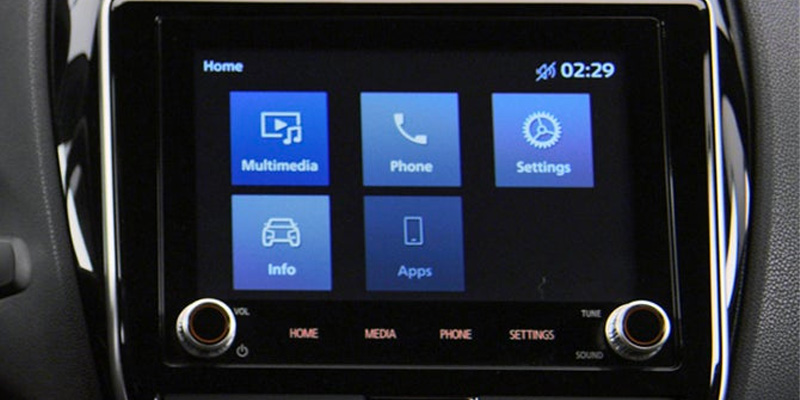
Modern driving is as much about connectivity as it is about performance, and new Mitsubishi technology ensures you experience both seamlessly. Whether you’re commuting through Plattsburgh, NY, or embarking on a long road trip, staying connected to your smartphone has never been easier. Mitsubishi Apple Car Play and Mitsubsihi Android Auto integration allow you to safely access essential apps, navigation, and entertainment directly from your vehicle’s infotainment system.
By connecting your iPhone or Android device to your new Mitsubishi, you unlock a smarter, safer way to drive. Let’s explore how to get started with these technologies.
Setting Up Apple Car Play in Your Mitsubishi
Connecting your iPhone to your new Mitsubishi using Apple Car Play is simple and intuitive, thanks to the advanced Mitsubishi technology and Infomat system. Start by ensuring your iPhone runs iOS 7.1 or later and that your Mitsubishi model supports Apple Car Play.
First, connect your iPhone to your vehicle using a Lightning cable. Upon connection, the Infomat system will prompt you to enable Apple Car Play. Once enabled, your car’s touchscreen will mirror your iPhone’s key functions, including Maps, Messages, and Music. Voice commands via Siri provide hands-free control, allowing you to stay focused on the road.
Whether you’re navigating the streets of Plattsburgh, NY, or streaming your favorite playlist, Mitsubishi Apple Car Play makes the experience both safe and enjoyable.
How to Use Android Auto in Your Mitsubishi
If you’re an Android user, Mitsubishi Android Auto delivers a similarly fantastic in-car experience. Begin by checking that your Android device runs version 5.0 or higher and that your Mitsubishi supports Android Auto.
To connect, use a USB cable to link your phone to your car’s Infomat system. Follow the on-screen prompts to enable Android Auto. Once activated, you’ll see a familiar interface on your vehicle’s touchscreen, giving you access to Google Maps, Google Assistant, and even popular music apps.
With voice control, you can send messages, make calls, or get directions—all without taking your hands off the wheel. It’s the perfect way to stay connected while exploring everything Plattsburgh, NY, has to offer.
Tips for Seamless Smartphone Connectivity
Mitsubishi technology ensures a smooth integration process, but here are a few tips to enhance your experience when connecting your iPhone or Android to your new Mitsubishi:
– Always use a high-quality USB cable to maintain a stable connection.
– Ensure your phone’s operating system and Mitsubishi’s Infomat software are up to date for optimal compatibility.
– Familiarize yourself with the voice command features of Siri and Google Assistant for effortless hands-free functionality.
By following these steps, you’ll enjoy uninterrupted access to the features you rely on most during your daily drives.
Experience the Best of New Mitsubishi Technology in Plattsburgh, NY
At Della Mitsubishi, we’re committed to helping drivers in Plattsburgh, NY, get the most out of their vehicles. With Mitsubishi Apple Car Play and Mitsubishi Android Auto, staying connected has never been easier or safer.
Visit us today to test drive a Mitsubishi at Della Mitsubishi and experience the cutting-edge Infomat system for yourself. Our team is here to answer your questions about connecting your iPhone or Android to your new Mitsubishi and to ensure your driving experience is seamless and enjoyable.
Connect with us


Recent Blog Entries
- The 2025 Mitsubishi Outlander PHEV: A Sustainable SUV with Real-World Substance
- Mitsubishi Maintenance Tips for Drivers
- 2026 Mitsubishi Eclipse Cross: Compact Size, Serious Capability
- 2026 Mitsubishi Outlander Trim Levels: Quick Guide for Plattsburgh, NY
- Why Regular Oil Changes Are Crucial for Your Mitsubishi